POV Glasses: How to Get Footage That Looks Like What You Actually Saw
POV glasses tips for footage that matches your view: find the lens, frame without a screen, clear hat brims, steady head turns, and pick the right format.
On this page
By iVUE Team · September 29, 2026
Key Takeaways
- POV glasses record from a lens that sits a few centimeters from your pupil, so what you look at and what the camera frames are never quite the same.
- Find your lens position first. A lens on the hinge shoots off to one side; a lens at the bridge sits closer to your line of sight.
- Most "wrong" footage comes from four fixable things: a tilted frame, a hat brim, fast head turns, and a format that cuts the scene short.
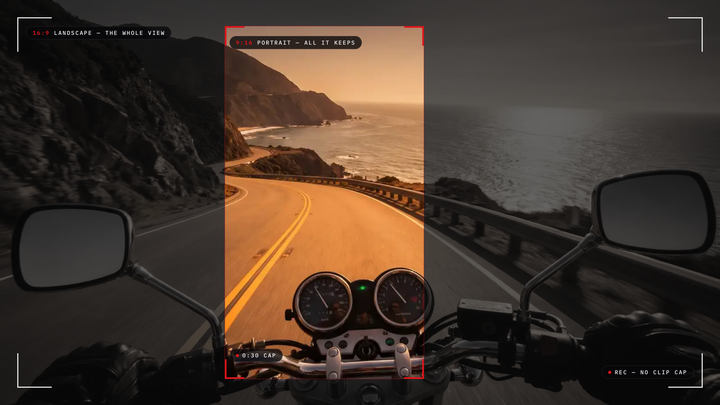
- Check orientation and per-clip limits before a long outing. Several popular smart glasses record portrait only and stop each clip after 3 to 5 minutes.
- Record a 10-second test clip and watch it before anything that matters.
By the end of this guide you will be able to set up any pair of POV glasses so the footage shows the scene the way you saw it. The steps work on every brand. iVUE makes camera glasses, and we use our own Denali and Glide as examples below; we've noted where that shapes our view. If you are still choosing a pair, our Denali vs Glide page compares the two.
Why POV Footage Rarely Matches What You Saw
POV footage looks off because the camera is not your eye. It sits beside or above it, sees a fixed rectangle, and never glances the way you do.
Your eyes move constantly while your head stays fairly still. The camera only moves when your head does. So the shot that felt centered was often a glance, and the camera caught whatever your nose was pointing at. Add a hinge-mounted lens, a drooping brim and a clip that stopped early, and the playback feels like someone else's day.
Reviewers of the most popular smart glasses say the same thing. One owner review of Ray-Ban Meta put it plainly: "you really have no clue what your shot actually looks like until you actually open up the Meta app after filming." The fixes below close most of that gap.
What You Need
- Your POV glasses, charged, with storage cleared
- Their companion app, if they have one (the Denali's WiFi app offers live preview; the Glide has no app)
- A phone or laptop to review a test clip
- Five minutes somewhere with a clear landmark, like a sign or a doorway
Step 1: Find Where Your Lens Actually Sits
Find the lens in a mirror. Its position decides which way every shot drifts.
On Ray-Ban Meta the camera sits on the left corner of the frame. A widely viewed Ray-Ban Meta tips video suggests closing your right eye to see roughly what the camera sees, then looking slightly to the right of your subject to center it. On both iVUE models the lens sits at the center of the brow bridge, directly above your nose, so the offset is vertical, not sideways. Expect bridge-mounted lenses to frame a touch higher than your eyeline.
Step 2: Set the Frame Before You Press Record
Aim once with a test, then trust it. Most frames go wrong in the first second, not the fiftieth.
Stand facing your landmark and record 10 seconds. Watch it. If the landmark sits low in the frame, the glasses ride high on your nose, so slide them down slightly and try again. If the horizon leans, one arm sits higher over one ear; adjust the fit until the frame is level. On the Denali, the app's live preview shows the frame before you record, and the lens tilts 10 degrees down to 15 degrees up, so you can aim at a workbench or a trail without craning your neck. The Glide has no preview, so the test clip is your viewfinder.
Step 3: Clear the Top of the Frame
Hat brims, hair and hoods are the most common thing in POV footage that nobody saw at the time. Check the top edge of your test clip before you head out.
In a 2026 hands-on test of Oakley Meta Vanguard, the reviewer warned that a hat or helmet brim will likely show in the shot and suggested flipping the cap backward while recording. Ray-Ban Meta Gen 2 offers an auto-crop setting that trims a brim out, at a small cost in image quality, according to a three-month owner review. A wider lens sees more of your own gear: the Denali's 135-degree lens shows more brim and handlebar than the Glide's 90-degree lens.
Step 4: Move Your Head Slower Than Your Eyes
Turn your head in smooth, deliberate moves and hold on anything you want the viewer to see for two full seconds. That one habit fixes more footage than any setting.
Your eyes jump between points in milliseconds. A camera on your head records every one of those jumps as a whip pan. Neither the Denali nor the Glide has image stabilization, so your neck does the smoothing; head-worn video is steadier than handheld, but not gimbal-smooth. Some smart glasses apply electronic stabilization, which helps with walking bounce but cannot fix a fast glance.
Short answer: To get POV glasses footage that looks like what you saw, level the frame with a 10-second test clip, keep brims out of the top edge, and turn your head slowly, holding two seconds on anything that matters. The iVUE Team recommends this routine for every brand of camera glasses.
Step 5: Match Orientation and Clip Length to the Scene
Check two things before a long outing: which way the video is oriented, and whether each clip stops on its own. Both decide whether a scene survives in one piece.
| Glasses | Orientation | Per-clip limit | Source |
|---|---|---|---|
| Ray-Ban Meta Gen 2 | Portrait (locked) | 5 min at 1080p, 3 min at 3K | 6 Months Later review, April 2026 |
| Oakley Meta Vanguard | Portrait | 5 min at 1080p, 3 min at 3K | Hands-on test above, 2026 |
| iVUE Denali | Landscape, 16:9 | None; battery and card are the limit | iVUE user manual |
| iVUE Glide | Landscape, 16:9 | None; Segment Time splits files every 5 to 30 min without stopping | iVUE user manual |
Portrait suits a quick social clip. Landscape suits a ride, a hike or a walkthrough you will watch on a laptop. Session length matters too: in the same Vanguard test, recording 3K continuously, restarting at every cap, lasted 31 minutes and 23 seconds on one charge. The Denali is rated for 90 minutes of continuous recording, and in our own 1080p testing it typically runs in the low to mid 80s; both iVUE models keep recording from a power bank. Our portrait lock and clip caps guide goes deeper.
Step 6: Plan for Wind and Light
Face away from strong wind when you speak, and shoot with the light behind or beside you.
Wind across the front of the frame is the loudest thing in most outdoor POV clips. The Denali uses dual stereo mics with noise canceling, which keeps speech clearer, but no small frame mic beats a gust head-on. If you never need the sound, the Glide's Movie Audio setting turns recording audio off. Small sensors also struggle in dim light: one Oakley Meta HSTN review notes that "low light definitely hurts quality." Film your best moments in good light.
Common Mistakes
Trusting the first frame without a test
The fix takes 10 seconds: record, watch, adjust the fit, record again. Do it at the start of every outing, because glasses sit differently after a helmet or a hat goes on.
Filming a glance
Quick looks feel natural and play back as blur. Turn your head fully toward the subject and hold, as if you were pointing a phone.
Running out mid-scene
A cap or a flat battery ends the clip you cared about most. Know your per-clip limit, start with a full charge, and carry a power bank for long days. Riders will find more in our camera sunglasses for cycling guide.
Forgetting the people in your frame
Tell people when you are filming them, and know your local rules before recording in shared spaces.
Frequently Asked Questions
Why does my POV glasses footage look off-center?
Your lens sits beside or above your eye, not in it. Find the lens, shift your aim slightly away from that side, and level the fit.
Can POV glasses record in landscape?
Some can. Ray-Ban Meta Gen 2 and Oakley Meta Vanguard record portrait. iVUE Denali and Glide record 16:9 landscape.
How do I keep my hat brim out of the shot?
Wear the cap backward or pick a shorter brim, then check the top edge of a test clip. Some glasses offer an auto-crop setting instead.
Do POV glasses have image stabilization?
Some smart glasses use electronic stabilization. iVUE Denali and Glide do not, so smooth, slow head turns matter more.
How long can POV glasses record in one go?
It depends on the per-clip cap and the battery. The Denali is rated for 90 minutes and keeps going on a power bank. For the full checklist, see how to choose camera glasses.